

✔ Fact-checked. For informational purposes only.
The garage is often the most frequently used entry point for modern families, yet it is frequently overlooked in smart home upgrades. Installing smart garage door openers transforms this basic mechanical entryway into a secure, monitored access point. Gone are the days of driving halfway to work only to panic about whether you closed the door. With these devices, you can verify the status of your garage instantly from your smartphone, grant access to delivery drivers, and receive real-time alerts whenever the door is cycled.
Whether you are retrofitting an existing motor or installing a brand-new unit, the process is surprisingly accessible for the average DIY enthusiast. This guide covers the essential installation steps and the critical security measures you must take to protect your home.
Choosing the Right System
Before you begin installation, you must determine which type of solution fits your current setup. There are two primary categories: full replacements and retrofit controllers. A full replacement involves buying a new motor unit with built-in Wi-Fi. A retrofit controller, like the popular Chamberlain myQ or Meross adapters, acts as a bridge; it wires into your existing motor and connects it to your Wi-Fi network.
Most smart garage door openers are compatible with belt, chain, and screw drive openers made after 1993 (those with safety sensor eyes). Always check the compatibility list provided by the manufacturer before purchasing.
Installation Overview
Installing a retrofit smart controller is generally a straightforward process that takes less than an hour. Safety is paramount: always unplug the garage door opener from the power outlet before touching any wiring.
Step-by-Step Basics
- Mount the Hub: Place the smart hub near the garage door motor on the ceiling, ensuring it has a strong Wi-Fi signal.
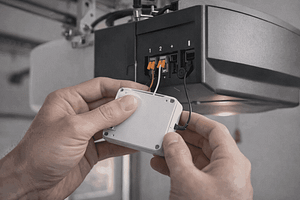
- Connect to Terminals: Locate the two terminals on the back of your motor where the wall button wires are connected. You will add the smart controller’s wires to these same terminals.
- Install Door Sensor: Most systems require a tilt sensor attached to the top panel of the garage door itself to detect if it is open or closed.
- App Configuration: Plug the unit back in, download the app, and follow the prompts to pair the device with your home network.
Security Best Practices
While adding connectivity adds convenience, it also introduces a new digital entry vector. To ensure your smart garage door openers remain secure, never reuse passwords. Enable Two-Factor Authentication (2FA) immediately within the app; this requires a secondary code sent to your phone to log in, preventing unauthorized access even if your password is compromised.
Additionally, integration with platforms like Amazon Key can allow verified drivers to leave packages safely inside your garage, reducing porch piracy. Ensure you configure notifications to alert you every time the door opens, so you are always aware of activity.
Frequently Asked Questions
Will a smart opener work if the Wi-Fi goes out?
The smart features (app control, alerts) will not work without Wi-Fi, but your physical wall button and handheld remotes will still function normally.
Can I install this on an old garage door?
Generally, yes, as long as the opener has safety reversing sensors (photo-eyes) near the floor. Openers manufactured before 1993 are typically not supported for safety reasons.
Is it safe to let delivery drivers in?
Services like Amazon Key are vetted and insured. The driver receives a one-time access token, and you receive a notification. You can also watch the delivery via a connected camera for extra peace of mind.
Conclusion
Upgrading to smart garage door openers offers a blend of convenience and enhanced physical security that few other smart home devices can match. By following proper installation procedures and adhering to strict digital security practices, you ensure that your home’s largest door is monitored and controlled effectively. Whether for checking status remotely or facilitating secure deliveries, this technology is a robust addition to any modern home.
📚 Safety Standards & Security References
-
CPSC (U.S. Consumer Product Safety Commission):
Garage Door Sensor Safety Standards
(Federal safety rules regarding UL 325 and auto-reverse mechanisms) -
CISA (Cybersecurity & Infrastructure Security Agency):
Securing Internet of Things (IoT) Devices
(Government guidelines on preventing unauthorized access to smart entry points) -
DASMA (Door & Access Systems Manufacturers Association):
Garage Door Opener Safety Tips
(Official industry best practices for safe installation and maintenance)
Disclaimer
This information is for educational and informational purposes only and does not constitute professional advice. Always consult with a qualified professional before making any decisions based on this content.
About the Expert
Alex Chen
Lead Technology Analyst & Smart Living Editor at FactaHub
Alex Chen leads the editorial direction and technical analysis for FactaHub’s Tech & Smart Living category. He is responsible for critically assessing new technologies and trends, ensuring that all published guides provide clear, unbiased, and actionable advice to readers seeking to integrate smart technology into their daily lives. Alex has nearly a decade of experience analyzing consumer electronics and developing user-centric solutions. Alex oversees a strict editorial process to maintain the credibility of FactaHub’s tech content, focusing on user safety, practicality, and longevity of tech products.
—